# Welcome to Pebble

Web3 gaming is a new genre. Pebble is a new place to gain through gaming. Pebble is the bridge which creates a new pathway to winning.

## The Pathway from web2 to web3

Pebble connects the Web2 UX and Web3 paradigms through games.

### True Ownership of Digital Assets

Users can easily access the blockchain game, manage their in-game items, and trade digital assets, all in one place.

### Easy Onboarding with Web2 UX

Pebble provides a Web2-friendly UX, allowing you to create a wallet through social login and offering network fee coverage. This makes it easy for you to transition from Web2 to Web3.

### Offering Games in Accessible Genres

Dive into a world of timeless classics, beloved by all and designed for easy enjoyment by everyone.

### Reliable and Transparent Web3 Service

Pebble's SUI Blockchain processes transactions faster than Ethereum and Solana, with predictable and affordable network fees. Plus, Pebble continuously enhances Web3 services through its longstanding partnership with SUI.


# What is a Wallet?

If you’re new to the Web3 world, the first thing you’ll need is a Wallet. A Wallet is necessary for owning and trading Tokens or NFTs.

Have you found it difficult to create a Web3 Wallet before? With Pebble, a Wallet is created instantly, if you log in with a social media account.

Pebble Wallet makes things easy! Even if this is your first time using a Web3 Wallet, all you need to know is your Wallet Address, and you can start trading digital assets right away.

## **What is a Wallet Address?**

A wallet address is a string of characters, comprising letters and numbers, used for conducting transactions involving digital assets.

You can send Tokens or NFTs to any other wallet address. You can also receive Tokens or NFTs to your wallet address from others.

A wallet address varies by blockchain. A Pebble wallet address is comprised of a combination of 64 letters and numbers.

<figure><img src="https://1143056142-files.gitbook.io/~/files/v0/b/gitbook-x-prod.appspot.com/o/spaces%2FTdlr1yThiCHB2zihA68M%2Fuploads%2FOGwyr7L9epzPROkcyEOh%2F%E1%84%89%E1%85%B3%E1%84%8F%E1%85%B3%E1%84%85%E1%85%B5%E1%86%AB%E1%84%89%E1%85%A3%E1%86%BA%202025-02-10%20%E1%84%8B%E1%85%A9%E1%84%92%E1%85%AE%205.22.42.png?alt=media&amp;token=ece68317-1826-46da-a923-ac0e33924111" alt="" width="511"><figcaption><p>[Example of a Custom Wallet Address]</p></figcaption></figure>

Is your wallet address long and complicated, making it hard to read?

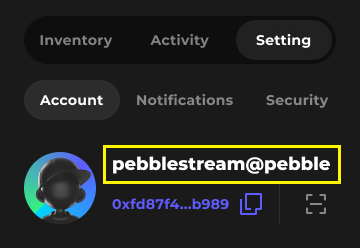
Pebble makes it easy by providing you with a Custom Wallet Address that’s simple to read and remember.

When you create a Pebble Wallet, just enter your name or a preferred word, and your unique wallet address will be generated.

Long, complex addresses are prone to errors, which can lead to incorrect transactions.

But with a Custom Wallet Address, it’s short, memorable, and helps ensure your assets are sent to the right place.

Create your personalized wallet address now and enjoy hassle-free transactions!

You can use Pebble's custom wallet address with external services as well. If the external service doesn’t support custom wallet addresses, simply use the address string starting with 0x.

## Pebble Wallet is for our service only

Pebble Wallet is a decentralized, non-custodial wallet that allows users to securely store, manage, and trade their cryptocurrencies on the Pebble Stream platform.

Pebble Wallet is only available for use with our service and can’t be registered on external wallet apps.

Never share your Pebble login info or transaction password – Pebble will never ask users for them.

If you lose your Pebble account login info, someone else could access your wallet and make transactions.

Make sure to keep your Pebble account login info and transaction password secure, and activate 2FA for your Pebble account and Wallet’s security.


# How to create your Pebble account and wallet

### To create your Pebble account and wallet, please follow the steps below.

1. Click on the “**Get Started**” button.

<div align="center"><figure><img src="https://1143056142-files.gitbook.io/~/files/v0/b/gitbook-x-prod.appspot.com/o/spaces%2FTdlr1yThiCHB2zihA68M%2Fuploads%2FxFvWPq3n5ZFjR4TKgkUf%2FMain%20SP%20(1).jpg?alt=media&amp;token=a5284e40-87ba-419c-b0c8-d6e812fda5cd" alt="" width="360"><figcaption></figcaption></figure></div>

2. **Create a Pebble account** by logging in with a social media account .

<figure><img src="https://1143056142-files.gitbook.io/~/files/v0/b/gitbook-x-prod.appspot.com/o/spaces%2FTdlr1yThiCHB2zihA68M%2Fuploads%2FYBVoeGQ4EYRvr0I7O4UL%2F2%20Start%20select%20Google%20Agree%20SP%20(1).png?alt=media&amp;token=f2435342-a95a-4024-9b27-1fabc3ac73b7" alt=""><figcaption></figcaption></figure>

3. **Enter your Wallet Name** and click Continue.

<figure><img src="https://1143056142-files.gitbook.io/~/files/v0/b/gitbook-x-prod.appspot.com/o/spaces%2FTdlr1yThiCHB2zihA68M%2Fuploads%2Fz2XrwTJAIQtJMN2KWIr3%2F2%20Create%20wallet%20SP.png?alt=media&amp;token=1ea0a09d-5b1f-472e-aa32-79d10c346149" alt=""><figcaption></figcaption></figure>

4. **Set your transaction password** and click Continue.

<figure><img src="https://1143056142-files.gitbook.io/~/files/v0/b/gitbook-x-prod.appspot.com/o/spaces%2FTdlr1yThiCHB2zihA68M%2Fuploads%2FWQzcclkDyjGOekdAOfWj%2F2%20Create%20wallet%20Trading%20PW%20Active%20SP.png?alt=media&amp;token=57eb8b3f-c23e-4f9d-8a51-c2d0a71ead36" alt=""><figcaption></figcaption></figure>

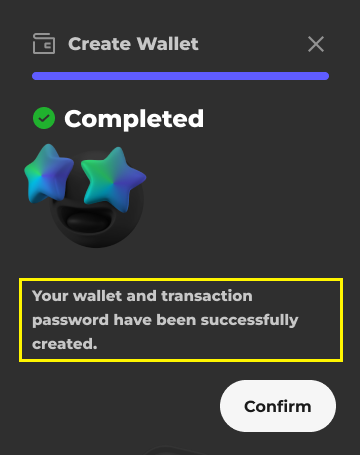
5. Account and Wallet creation is now complete.

<figure><img src="https://1143056142-files.gitbook.io/~/files/v0/b/gitbook-x-prod.appspot.com/o/spaces%2FTdlr1yThiCHB2zihA68M%2Fuploads%2F3r2TVM4yG8uSjXNNsPcR%2F2%20Create%20wallet%20Result%201%20SP%20re.png?alt=media&amp;token=04f48c24-790e-4b0b-b6a6-6719ec89cc1f" alt=""><figcaption></figcaption></figure>

6. **Check your custom wallet address** in the profile section of My Page.

<figure><img src="https://1143056142-files.gitbook.io/~/files/v0/b/gitbook-x-prod.appspot.com/o/spaces%2FTdlr1yThiCHB2zihA68M%2Fuploads%2FetVhlAS7ucNg6sWKMIrZ%2F3%20My%20Page%203%20Setting%20SP.png?alt=media&amp;token=2aa93472-6c29-44ff-800a-bd68629c90f9" alt=""><figcaption></figcaption></figure>


# How to connect games

To access your game information or convert items on Pebble, you must first Connect your game account. The **Connect Game** button can be found under **My Page > Setting > Account** or in any section requiring game data access.

### Steps to Connect Your Game Account

{% stepper %}
{% step %}
Click the **Connect Game** (or **Connect**) button.
{% endstep %}

{% step %}
Log in with your game account.

* Choose the login method you use to access the game.
* If you don’t have a game account, install the game through the provided **Download App QR code or button** and create an account.

<figure><img src="https://1143056142-files.gitbook.io/~/files/v0/b/gitbook-x-prod.appspot.com/o/spaces%2FTdlr1yThiCHB2zihA68M%2Fuploads%2Fp5xVLBsqcpoYghBsPQqU%2Fgame%20login.png?alt=media&amp;token=475088aa-d2b9-4e18-b504-bdba29c9a557" alt=""><figcaption></figcaption></figure>
{% endstep %}

{% step %}
Complete the game account Connecting process.

<figure><img src="https://1143056142-files.gitbook.io/~/files/v0/b/gitbook-x-prod.appspot.com/o/spaces%2FTdlr1yThiCHB2zihA68M%2Fuploads%2FCeHWgAipo9XHadeViDTY%2Fconnect_success.png?alt=media&amp;token=d07b3525-4377-45df-b963-c9a8c32bfd73" alt=""><figcaption></figcaption></figure>
{% endstep %}
{% endstepper %}

> **Note:** Since the account Connecting process is on a 1:1 basis, if your game account is already Connected to another Pebble account, you must first disconnect it before proceeding.

Once connected, you can view your in-game items on Pebble.

***

##


# How to convert Pebble City Tokens and NFTs

In Pebble, **Convert** refers to the process of transforming game items into **Game Tokens** or **NFTs**, and vice versa. You can access the **Convert** feature through the **Convert menu** or **My Page > Inventory** after logging in to Pebble.

* [Convert Star to Starble Token(STBL)](/game-connect-convert/how-to-convert-pebble-city-tokens-and-nfts/convert-star-to-stbl)
* [Convert Strarble Token(STBL) to MasterChip](/game-connect-convert/how-to-convert-pebble-city-tokens-and-nfts/convert-stbl-to-masterchip)
* [Convert In-Game Items to NFT](/game-connect-convert/how-to-convert-pebble-city-tokens-and-nfts/convert-in-game-items-to-nft)
* [Convert NFT to In-Game Items](/game-connect-convert/how-to-convert-pebble-city-tokens-and-nfts/convert-nft-to-in-game-items)


# Convert Star to STBL

Once your game is Connected, you can go to the **Convert > Token Convert** page through the Navigation Bar or check your Star balance in **My Page > Inventory** and proceed with the conversion.

### Steps to Convert Star to Starble Token(STBL)

{% stepper %}
{% step %}
**Go to** [**My Page > Inventory**](https://www.pebblestream.io/account/inventory) **and click "Convert"** on the Star balance.

<figure><img src="https://1143056142-files.gitbook.io/~/files/v0/b/gitbook-x-prod.appspot.com/o/spaces%2FTdlr1yThiCHB2zihA68M%2Fuploads%2FRU33J9EKMR8XMl5ThgTm%2Finventory_convert.png?alt=media&amp;token=0bcb935d-7aeb-43fe-aa85-2493f99c9e5d" alt=""><figcaption></figcaption></figure>

{% endstep %}

{% step %}
Enter the amount of Stars to convert and verify the amount of STBL you will receive before proceeding.

<figure><img src="https://1143056142-files.gitbook.io/~/files/v0/b/gitbook-x-prod.appspot.com/o/spaces%2FTdlr1yThiCHB2zihA68M%2Fuploads%2FiaUbxtk25ypANcrrEsqF%2Fstar%20to%20starble.png?alt=media&amp;token=d32339c0-5c92-492a-9935-46bf3fa8d555" alt=""><figcaption></figcaption></figure>

* A minimum of **100,000 Stars** is required to convert.
* **Exchange rate:** **10,000 Stars = 1 STBL (10,000:1 ratio).**

{% endstep %}

{% step %}
Click the Convert button and enter your transaction password to complete the conversion.

* The conversion process typically takes a few seconds to complete, but times may vary depending on network conditions.
  {% endstep %}

{% step %}
After completing the conversion, you can check your updated **Star and STBL balances** in [**My Page > Inventory**](https://www.pebblestream.io/account/inventory).

{% endstep %}
{% endstepper %}

{% hint style="info" %}
*A **wallet** is required to receive Starble. If you don’t have one, you must create it first.*
{% endhint %}


# Convert STBL to MasterChip

To convert STBL to MasterChip, you must have STBL in your Pebble Wallet.

If you have STBL, you can go to the **Convert > Token Convert** page through the Navigation Bar or check your STBL balance in **My Page > Inventory** and proceed with the conversion.

### Steps to Convert Starble Token(STBL) to MasterChip

{% stepper %}
{% step %}
**Go to** [**My Page > Inventory**](https://www.pebblestream.io/account/inventory) **and click "Convert"** on the STBL balance.

<figure><img src="https://1143056142-files.gitbook.io/~/files/v0/b/gitbook-x-prod.appspot.com/o/spaces%2FTdlr1yThiCHB2zihA68M%2Fuploads%2F8rZYMmMxLewB8tuz0lDT%2FIMG_7085.PNG?alt=media&amp;token=3c380f13-82e7-4d18-84ea-dca1b3d07856" alt=""><figcaption></figcaption></figure>
{% endstep %}

{% step %}
Enter the amount of STBL to convert and verify the amount of MasterChip you will receive before proceeding.

<figure><img src="https://1143056142-files.gitbook.io/~/files/v0/b/gitbook-x-prod.appspot.com/o/spaces%2FTdlr1yThiCHB2zihA68M%2Fuploads%2FM1zIap0u0qEF1bmlvHbw%2Fconvert%20to%20masterchip.PNG?alt=media&amp;token=d9752a26-9d07-42b9-82c9-31651c9df023" alt=""><figcaption></figcaption></figure>

* The **conversion rate improves** when converting larger amounts of Starble. For example, converting 10 Starble may yield a 5% bonus, while converting 20 Starble could provide a 25% bonus.
* Conversion rates may change based on service conditions, so confirm the expected **MasterChip amount** before proceeding.

{% endstep %}

{% step %}
Click the Convert button and enter your transaction password to complete the conversion.

* A **SUI coin network fee of 0.1 or less** is required for conversion. However, Pebble **sponsors up to 3 network fees per account**!
  {% endstep %}

{% step %}
After completing the conversion, you can check your updated Starble balances in [**My Page > Inventory**](https://www.pebblestream.io/account/inventory).

{% endstep %}
{% endstepper %}


# Convert In-Game Items to NFT

For **Pebble City**, once your game account is Connected, packaged items in the **game's Package system** will appear under **My Page > Inventory > In-Game Item**.

### Steps to convert an item into an NFT

{% stepper %}
{% step %}
First, package the item you want to convert to an NFT in the **PACKAGE** menu within the Pebble City game.

* Once your game account is connected, you can check the packaged item in [**My Page > Inventory > In-game Items**](https://www.pebblestream.io/account/inventory/items).
  {% endstep %}

{% step %}
Go to the [**Convert to NFT**](https://www.pebblestream.io/account/inventory/item/convert) page through the global bar or click the **More(...)** **button** on the item.

<figure><img src="https://1143056142-files.gitbook.io/~/files/v0/b/gitbook-x-prod.appspot.com/o/spaces%2FTdlr1yThiCHB2zihA68M%2Fuploads%2FE6wAr3pzi28Jrl4TcME0%2Fmore-convert%20to%20NFT2.PNG?alt=media&amp;token=c124012e-c3a3-47b4-8d98-c1b163f3a587" alt=""><figcaption></figcaption></figure>
{% endstep %}

{% step %}
Select the packaged item and adjust the quantity.

<figure><img src="https://1143056142-files.gitbook.io/~/files/v0/b/gitbook-x-prod.appspot.com/o/spaces%2FTdlr1yThiCHB2zihA68M%2Fuploads%2FN76rFedNlGG4MH24bKEo%2Fconvert%20to%20NFT.PNG?alt=media&amp;token=c881ff70-b953-4a31-8a48-80f9ac7e09f4" alt=""><figcaption></figcaption></figure>
{% endstep %}

{% step %}
Click **Convert** and and Enter your transaction password to proceed.

{% endstep %}

{% step %}
After completing the conversion, you can now view the NFT in your inventory.

{% endstep %}
{% endstepper %}


# Convert NFT to In-Game Items

Check your **Pebble City NFTs** under **My Page > Inventory > NFT**.

### Steps to Convert NFT to In-Game Items

{% stepper %}
{% step %}
Go to the [**Convert to Items**](https://www.pebblestream.io/account/inventory/nft/convert) page through the global bar, or select the desired NFT from [**Inventory > NFTs**](https://www.pebblestream.io/account/inventory/nfts) and proceed with the conversion.

<figure><img src="https://1143056142-files.gitbook.io/~/files/v0/b/gitbook-x-prod.appspot.com/o/spaces%2FTdlr1yThiCHB2zihA68M%2Fuploads%2FhMwdVHZfecsAzYjFmYPb%2Fselect%20NFT.PNG?alt=media&amp;token=e62f640c-9acc-4c1e-b15c-33250c3c2879" alt=""><figcaption></figcaption></figure>
{% endstep %}

{% step %}
Confirm the quantity and Estimated Network Fee. Enter your transaction password to proceed.

<figure><img src="https://1143056142-files.gitbook.io/~/files/v0/b/gitbook-x-prod.appspot.com/o/spaces%2FTdlr1yThiCHB2zihA68M%2Fuploads%2FvVQ9v2TRxPHJSeaGUjwM%2Fconvert%20to%20items.PNG?alt=media&amp;token=dedd0e80-b19b-4e73-81a7-fe35b033790e" alt=""><figcaption></figcaption></figure>

* A **SUI coin network fee of 0.1 or less** is required for conversion. Pebble **sponsors up to 3 network fees per account!**
  {% endstep %}

{% step %}
Log in to the game and check the converted items.

* You can view your conversion history in [**My Page > Activity > Convert History**](https://www.pebblestream.io/account/activity/convert/token) or in the INBOX within the game.
  {% endstep %}
  {% endstepper %}

{% hint style="info" %}
*Casino membership invitation NFT can be converted and revealed (opened) in the in-game inventory.*
{% endhint %}


# What are Network Fees?

## Why is SUI Coin needed when sending or converting digital assets?

Every blockchain transaction requires a certain fee. Since all transactions on the Pebble service are based on the **SUI blockchain**, you need to hold SUI Coins in your wallet to cover the transaction fees.

Blockchain transactions are made without intermediaries, and once the transaction information is recorded, it cannot be modified or tampered with. Thanks to this characteristic, blockchain transactions are highly transparent and secure.

If you’d like to learn more about blockchain, please read the document below.

* [What is Web3?](/blockchain/what-is-web3)
* [What is Blockchain?](/blockchain/what-is-blockchain)

## **Pebble Offers 3 Free Conversion Fees!**

The SUI blockchain we use provides more predictable and lower fees compared to Ethereum and Solana, ensuring a more efficient transaction environment. With just **0.1 SUI** in your wallet, you can instantly convert game tokens or game NFTs.

We also fully cover the conversion fees for game tokens and game NFTs up to **3 times**, making it easier for you to enjoy blockchain games!


# How to deposit SUI coins into your wallet

### Here's how you can top up SUI to your wallet using MoonPay

{% stepper %}
{% step %}
**Go to the MoonPay Page**

* Visit the MoonPay SUI purchase page in your browser.
* [MoonPay](https://www.moonpay.com/buy/sui)
  {% endstep %}

{% step %}
**Enter the Purchase Amount**

* Type the amount you want to spend (in USD, EUR, etc.), and MoonPay will show you how much SUI you'll receive.

<figure><img src="https://1143056142-files.gitbook.io/~/files/v0/b/gitbook-x-prod.appspot.com/o/spaces%2FTdlr1yThiCHB2zihA68M%2Fuploads%2FQlKv20n0tznRkHe6va5A%2Fimage.png?alt=media&amp;token=4a445a15-8ac0-4163-b0aa-9a983e770ca2" alt="" width="262"><figcaption></figcaption></figure>
{% endstep %}

{% step %}
**Sign Up**

* Sign up with your email or Google account.

<figure><img src="https://1143056142-files.gitbook.io/~/files/v0/b/gitbook-x-prod.appspot.com/o/spaces%2FTdlr1yThiCHB2zihA68M%2Fuploads%2FQ8kWX3G4Upnn4se8et2B%2F%E1%84%89%E1%85%B3%E1%84%8F%E1%85%B3%E1%84%85%E1%85%B5%E1%86%AB%E1%84%89%E1%85%A3%E1%86%BA%202026-04-28%20%E1%84%8B%E1%85%A9%E1%84%92%E1%85%AE%209.16.09.png?alt=media&amp;token=72e25b62-4c7a-4aa6-92a0-6ed05a5a33a0" alt="" width="286"><figcaption></figcaption></figure>
{% endstep %}

{% step %}
**Verify Your Identity**

* MoonPay requires identity verification to comply with anti-money laundering regulations. Just follow the on-screen steps to complete it.

<figure><img src="https://1143056142-files.gitbook.io/~/files/v0/b/gitbook-x-prod.appspot.com/o/spaces%2FTdlr1yThiCHB2zihA68M%2Fuploads%2FPp3L6LZYLcHxEuQuOOpi%2F%E1%84%89%E1%85%B3%E1%84%8F%E1%85%B3%E1%84%85%E1%85%B5%E1%86%AB%E1%84%89%E1%85%A3%E1%86%BA%202026-04-28%20%E1%84%8B%E1%85%A9%E1%84%92%E1%85%AE%209.15.55.png?alt=media&amp;token=49a4cd58-6ddc-4f8d-b60f-fd8acf14639c" alt="" width="286"><figcaption></figcaption></figure>
{% endstep %}

{% step %}
**Choose a Payment Method and Pay**

* Select how you'd like to pay (card, Apple Pay, Google Pay, etc.) and complete the payment.

<figure><img src="https://1143056142-files.gitbook.io/~/files/v0/b/gitbook-x-prod.appspot.com/o/spaces%2FTdlr1yThiCHB2zihA68M%2Fuploads%2FA39JIabgXPzMU4EUreJx%2FFrame%2011542.png?alt=media&amp;token=7c15fb4e-dd65-4c88-a706-9cb030fa968c" alt="" width="286"><figcaption></figcaption></figure>
{% endstep %}

{% step %}
**Confirm Your Deposit**

* Once your payment is approved, your SUI will typically arrive in your wallet within **a few minutes**. Check your wallet balance to confirm the transaction is complete.
  {% endstep %}
  {% endstepper %}

### Here’s how you can buy SUI coins from an exchange and transfer them to your Pebble Wallet

{% stepper %}
{% step %}
**Visit an** **external cryptocurrency exchange** to buy SUI coins. Some of the major exchanges include:

* [Binance](https://www.binance.com/en)
* [Coinbase](https://www.coinbase.com/)
  {% endstep %}

{% step %}
**Transfer the purchased SUI coins** from your external exchange wallet to your Pebble Wallet.

* Enter the recipient's wallet address as either Pebble's custom wallet address, '**wallet name\@pebble**', or a string address starting with 0x.
* Make sure the **SUI network** is correctly selected before proceeding with the transfer.
  {% endstep %}

{% step %}
Once the transfer is complete, **check your Pebble Wallet** to confirm that the SUI coins have been successfully deposited.

<figure><img src="https://1143056142-files.gitbook.io/~/files/v0/b/gitbook-x-prod.appspot.com/o/spaces%2FTdlr1yThiCHB2zihA68M%2Fuploads%2FLfLpJH2seopQi6t9LPpJ%2FMy%20Page_Sui%20Balance.png?alt=media&amp;token=b3e3d161-2137-48ad-a379-db2ac4aed0fc" alt=""><figcaption></figcaption></figure>
{% endstep %}

{% step %}
You can view SUI coin transfer history on the **Transaction History** page. Additionally, you can click the Tx ID to view details on Sui Explorer.

<figure><img src="https://1143056142-files.gitbook.io/~/files/v0/b/gitbook-x-prod.appspot.com/o/spaces%2FTdlr1yThiCHB2zihA68M%2Fuploads%2FkZFUcdRhpBRdsqp8gnm5%2F3%20My%20Page%202%20Activity%20Convert%20NFT%20SP.png?alt=media&amp;token=e72bc221-f8a0-47e1-a439-0c23a14d0dc2" alt=""><figcaption></figcaption></figure>
{% endstep %}
{% endstepper %}

### How to Obtain USDC and USDsui

You can obtain USDC and USDsui through the exchanges listed below.

* **USDC**: [Binance](https://www.binance.com/en), [Coinbase](https://www.coinbase.com/)
* **USDsui**: [Cetus](https://app.cetus.zone/swap), [Bluefin](https://trade.bluefin.io/)


# How to send tokens and NFTs

### To send tokens from your wallet to another wallet, follow the steps below.

{% stepper %}
{% step %}
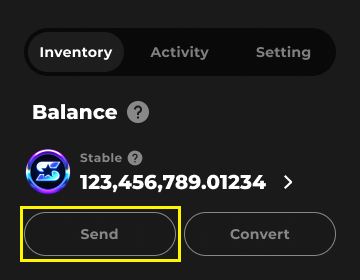
**Go to My Page > Inventory and click "Send"** on the token you want to transfer.

<figure><img src="https://1143056142-files.gitbook.io/~/files/v0/b/gitbook-x-prod.appspot.com/o/spaces%2FTdlr1yThiCHB2zihA68M%2Fuploads%2FdQ8lPyD2aW4flf3186Ac%2Fsend_starble.png?alt=media&amp;token=b503b5b1-b81f-48d2-b5f3-2901e8873517" alt=""><figcaption></figcaption></figure>
{% endstep %}

{% step %}
**Enter the amount of tokens to send and the recipient’s wallet address** (custom wallet address or a string address starting with "0x")

<figure><img src="https://1143056142-files.gitbook.io/~/files/v0/b/gitbook-x-prod.appspot.com/o/spaces%2FTdlr1yThiCHB2zihA68M%2Fuploads%2FsamUytbkOCCpI8NYe88u%2F11%20Send%20Active%20SP%20(2).png?alt=media&amp;token=216099f7-0d2b-48dd-b917-45bd9ba7390a" alt=""><figcaption></figcaption></figure>
{% endstep %}

{% step %}
**Check the network fee and click Send**. If you don’t have SUI coins, check how to deposit SUI.

<figure><img src="https://1143056142-files.gitbook.io/~/files/v0/b/gitbook-x-prod.appspot.com/o/spaces%2FTdlr1yThiCHB2zihA68M%2Fuploads%2Fyhvzcm6v5sPYiZWmTh2k%2F11%20Send%20Active%20SP%20(3).png?alt=media&amp;token=dede5226-731b-4787-b939-0ac71a2a2a43" alt=""><figcaption></figcaption></figure>
{% endstep %}

{% step %}
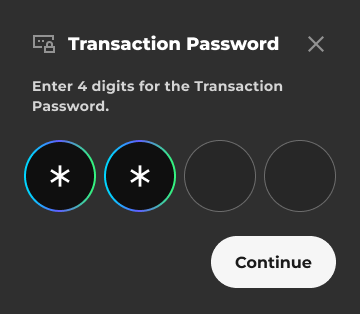
Enter your **transaction password**.

<figure><img src="https://1143056142-files.gitbook.io/~/files/v0/b/gitbook-x-prod.appspot.com/o/spaces%2FTdlr1yThiCHB2zihA68M%2Fuploads%2FnMaw70i8iTiVk4g69QN1%2FTransaction%20PW%20SP.png?alt=media&amp;token=e3f35058-0e64-4855-ad61-a1c1ea4811d9" alt=""><figcaption></figcaption></figure>
{% endstep %}

{% step %}
Once the transfer is complete, check your transaction history under **My Page > Activity > Send History**. Click the Tx ID for more details on Sui Explorer.

<figure><img src="https://1143056142-files.gitbook.io/~/files/v0/b/gitbook-x-prod.appspot.com/o/spaces%2FTdlr1yThiCHB2zihA68M%2Fuploads%2FsYGcgsRVwMvzKDXWKGfT%2F3%20My%20Page%202%20Activity%20Send%20History%20Token%20SP%20(1).png?alt=media&amp;token=9479eeff-56f0-41db-92c8-d227ec887d9b" alt=""><figcaption></figcaption></figure>
{% endstep %}
{% endstepper %}

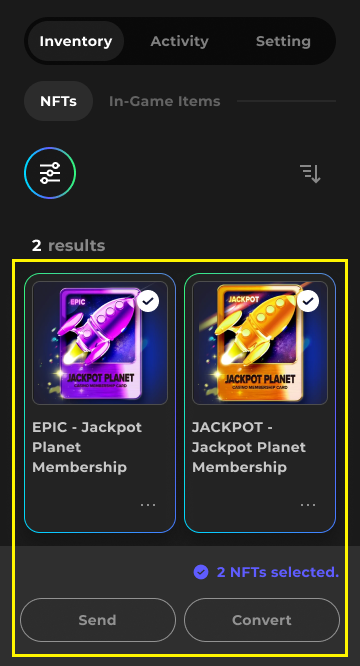
### To send NFTs&#x20;

Go to Inventory, **select the NFTs you want to transfer, and click "Send."**

<figure><img src="https://1143056142-files.gitbook.io/~/files/v0/b/gitbook-x-prod.appspot.com/o/spaces%2FTdlr1yThiCHB2zihA68M%2Fuploads%2FuwUTqquv2vRBVqUKLRNq%2F3%20My%20Page%201%20NFTs%20Active%20SP.png?alt=media&amp;token=d36f0610-8f76-4e05-ab9b-c67bcc53ed2d" alt=""><figcaption></figcaption></figure>

{% hint style="info" %}
*SBTs cannot be transferred as they are permanently bound to the owner's account.*
{% endhint %}

Once the NFT transfer is complete, you can check your transaction history under **My Page > Activity > Send History**.


# What is Web3?&#x20;

Web3 refers to the third era of the internet, representing a decentralized internet.

It emerged as a way to reform the centralized structure imposed by by a few platform companies that have a monopolize on users’ data in the Web2 era.

In Web3, users can fully own and manage their data.

Users can generate revenue by selling the data they own to others. Additionally, only the user can change or delete their data.

## Emergence of Web3

Web 1.0 was the beginning of the internet, where users searched for and read content by websites. This era‘s web is referred to asthe “read-only” web.

In the Web 2.0 era, people started creating content directly on platforms. They shared writing and images on websites and social media. People shared their thoughts through platforms and actively communicated with others. This era’s web is referred to as a “read-write” web.

In Web 2.0, platform companies owned data. Platform companies earned revenue from ads by utilizing user-created data, but users couldn’t profit from their own data. There were additional privacy concerns, such as platform companies selling user information to third parties or using it without authorization. As a result, people found it difficult to trust Web 2.0 platforms.

To reform the structure where profit and power are centralized to a few platforms, the Web3 paradigm came into play.&#x20;

Web3 realized a decentralized internet by utilizing Blockchain technology. Data stored on the Blockchain is managed by an unspecified number of people, not a specific few companies. Users can preserve data indefinitely by recording the ownership of their data on the Blockchain. This era of Web3 is called the “read-write-own” web.

## Web3 and Games

Web3 game services are innovative and distinguish themselves from traditional games.

### Ownership of Game Assets

In a Web3 game, players have complete ownership of their in-game assets and content. A player’s in-game assets and content are securely stored on the Blockchain. Even if a game ends or the service is updated, players own these assets indefinitely.

### Trading Game Assets and Earning Rewards

Players can sell their game assets to other players & accumulate rewards through their participation and skill in our social games. Transaction details are clearly recorded on the Blockchain and anyone can check to confirm. In-game economic activities become more active as players trade the items they purchased or the assets they earned by playing the game.

Pebble transparently records and safely preserves the ownership of game assets and transaction information by utilizing Blockchain technology.  Through this, Pebble provides players a safe and trustworthy gaming experience.


# What is Blockchain?

A Blockchain is a digital storage where data is recorded. The same data is stored on multiple computers that are connected to the network.

Since numerous computers share and manage data collectively, it is impossible for someone to forge data because they would have to alter data stored in all the computers. This is why, once data is recorded on the Blockchain, it is preserved indefinitely.&#x20;

Anyone can verify data recorded on the Blockchain through a Blockchain website.

Thus, ownership of game assets recorded on the Blockchain is guaranteed to be transparent and permanent.

If a player wants to save a game token or NFT on the Blockchain, they have to pay Blockchain usage fees. This usage fee is distributed as management compensation costs to the numerous computers that manage Blockchain data. The usage fee maintains the Blockchain system and prevents users from abusing Blockchain resources.

The usage fee of the SUI Blockchain, developed by Pebble, is designed to be affordable so that users can effectively utilize Blockchain functions. Thanks to this design, more users can connect to Pebble, experience Blockchain services, and use them freely.


# What are digital assets?&#x20;

Digital Assets are assets that exist in digital form and provide users with usage permissions or ownership. Data that lacks usage permissions or ownership is not considered a Digital Asset.

After Blockchain technology emerged, Digital Assets now referred to assets that have investment value such asTokens and NFTs created using Blockchain technology.

In a Web3 game, NFTs are used to represent game items and characters. Players can make money by freely trading their NFTs in the marketplace.

### Token

Tokens are assets that are issued to the Blockchain. A Token that you own has the same asset value as a Token owned by someone else, so it can be exchanged.&#x20;

In a Web3 game, Tokens are used as the medium to trade game items. Players can obtain Tokens by playing games and use them to  purchase in-game items with Tokens.

### NFT(Non-Fungible Token)

NFTs are assets  issued on the Blockchain and are referred to as irreplaceable Tokens. Since an NFT that you own is unique in itself, it holds a distinct asset value compared to an NFT that someone else.

In a Web3 game, NFTs are used to represent game items and characters. Players can make money by freely trading their NFTs in the marketplace.&#x20;


# Terms of Service Update (Apr 29, 2026)

We are updating our Terms of Service (the “Terms”) to reflect new wallet and payment options on the Pebble Platform. The full updated Terms will be published on the effective date. In the meantime, this notice contains the exact before-and-after text of every material change so you can review them in full before the Terms take effect.

## Summary of changes

#### 1. Wallet options — Connect an External Wallet

<mark style="color:purple;">What’s changing</mark>: Previously, under the platform Terms, account creation was only available through IdP/social login (together with creating a Pebble Wallet). Going forward, you can also sign up and create your account by connecting an external wallet.

**Section 3. Pebble Account and Wallet — Account Creation**

<table data-header-hidden><thead><tr><th valign="top"></th><th valign="top"></th></tr></thead><tbody><tr><td valign="top">As-is</td><td valign="top">To-be</td></tr><tr><td valign="top">To access certain Services on our Website, you are generally required to create a Pebble Stream account (the “Pebble Account”) by entering your IdP integration / social login details (“Login Information”), unless otherwise determined by the Company in its sole discretion. For instance, users of the Pebble Stream platform are not required to create a Pebble Account in order to participate in any NFT pre-sales (e.g. the Pebble City NFT pre-sales). To successfully create a Pebble Account on our Website, you will need to: (A) confirm that you are at least 18 years or above; (B) acknowledge that you have read and agree to these Terms and the Privacy Policy on the website; and (C) create a digital wallet for the purposes of using certain tokens (e.g. SUI token, Game Token (as defined below)) (“Pebble Wallet”), Game NFTs for in-game play. By using our Services, you also acknowledge and agree that all information provided by you for the purpose of creating your Pebble Account is valid, current, complete and accurate.</td><td valign="top">To access certain Services on our Website, you are generally required to create a Pebble Stream account (the “Pebble Account”), unless otherwise determined by the Company in its sole discretion. For instance, users of the Pebble Stream platform are not required to create a Pebble Account in order to participate in any NFT pre-sales (e.g. the Pebble City NFT pre-sales). To successfully create a Pebble Account on our Website, you will need to: (A) confirm that you are at least 18 years or above; (B) acknowledge that you have read and agree to these Terms and the Privacy Policy on the website; and (C) <strong>connect an external wallet (the “External Wallet”) or create a digital wallet (“Pebble Wallet”</strong>) (collectively, the “Wallet”) for the purposes of using certain tokens (e.g. SUI token, Game Token (as defined below)), Game NFTs for in-game play. By using our Services, you also acknowledge and agree that all information provided by you for the purpose of creating your Pebble Account is valid, current, complete and accurate.</td></tr></tbody></table>

**Section 3. Pebble Account and Wallet — Scope of Wallet Restrictions**

<table data-header-hidden><thead><tr><th valign="top"></th><th valign="top"></th></tr></thead><tbody><tr><td valign="top">As-is</td><td valign="top">To-be</td></tr><tr><td valign="top">Pebble Wallet is an integral feature of our Services and is designed exclusively for use within our platform. You acknowledge and agree that the Pebble Wallet cannot be used or accessed through any external wallet applications, third-party software, or non-Pebble services. In the event our Services are discontinued or otherwise terminated, you understand and accept that access to the digital assets stored within the Pebble Wallet will be permanently revoked. By using the Pebble Wallet, you agree we shall not be held liable for any loss or inability to access digital assets following such termination. By creating or using the Pebble Wallet, you explicitly acknowledge and agree to the conditions outlined in this clause. It is your responsibility to manage your use of the Pebble Wallet in accordance with these Terms.</td><td valign="top">You acknowledge and agree that the Pebble Wallet cannot be used or accessed through any other wallet applications, third-party software, or non-Pebble services. <strong>For the avoidance of doubt, this restriction applies solely to the Pebble Wallet issued by us and does not restrict your use of any External Wallet connected to your Pebble Account. Any use of an External Wallet is subject to the terms and policies of its respective provider, and Pebble Stream shall not be held liable for any issues, losses, or damages arising from or related to your use of such External Wallets</strong> In the event our Services are discontinued or otherwise terminated, you understand and accept that access to the digital assets stored within the Pebble Wallet will be permanently revoked. By using the Pebble Wallet, you agree we shall not be held liable for any loss or inability to access digital assets following such termination. By creating or using the Pebble Wallet, you explicitly acknowledge and agree to the conditions outlined in this clause. It is your responsibility to manage your use of the Pebble Wallet in accordance with these Terms.</td></tr></tbody></table>

#### 2. New Payment Service

<mark style="color:purple;">What this means for you</mark>: We are introducing a Payment Service that lets you pay for affiliated services on the Pebble Platform (including games operated by Pebble Stream) using SUI and other designated virtual assets. Because these are blockchain transactions, payments are final and non-refundable, virtual-asset price fluctuations are not compensable, and you are responsible for Gas Fees, taxes, and errors arising from your wallet address, device, or network.

**Section 10. Payment Service (new section)**

<table data-header-hidden><thead><tr><th valign="top"></th><th valign="top"></th></tr></thead><tbody><tr><td valign="top">As-is</td><td valign="top">To-be</td></tr><tr><td valign="top"><em>(No corresponding provision in the current Terms.)</em></td><td valign="top"><p><strong>10. Payment Service</strong></p><p>We provide a payment service (the “Payment Service”) that enables you to pay for affiliated services on the Pebble Platform, including games directly operated by Pebble Stream (each, an “Affiliated Service”), using payment methods designated by us from time to time, including but not limited to virtual assets such as SUI (each, a “Payment Method”).</p><p>Due to the nature of blockchain technology and digital assets, any conversion conducted is final and irreversible. Once a transaction has been completed on the blockchain, we cannot issue refunds, reverse the transaction, you are advised to carefully review all details before confirming any payment.</p><p>The value of virtual assets used as a Payment Method may fluctuate in real time depending on market conditions. You acknowledge and agree that any change in the value of virtual assets following a completed payment does not give rise to a right to cancel the payment or to claim any compensation from us. By using the Payment Service, you acknowledge and accept the risks associated with such fluctuations.</p><p>All costs incurred in connection with the Payment Service, including blockchain network fees (Gas Fees) and any applicable taxes arising from payments made using virtual assets (including SUI), will be borne by you. The gas fees are calculated based on current network conditions and are not controlled by us. We are not responsible for gas fees, or any other cost associated with the transaction process. By proceeding with any payment transaction, you acknowledge and accept these charges.</p><p>We are not responsible for any payment errors or failures arising from, including but not limited to: (a) entry of an incorrect wallet address; (b) delays, congestion, or failures in network transmission; (c) errors attributable to your device, software, or network environment; or (d) any other circumstances within your control. You are advised to carefully verify all transaction details, including wallet addresses and payment amounts, before confirming any payment.</p></td></tr></tbody></table>

#### 3. How we send you notices

<mark style="color:purple;">What this means for you</mark>: In addition to email, we may provide notices through in-Service messages, our Website, and official channels such as Discord. Such notices will be deemed received at the time they are posted or transmitted.

**Section 3 — Electronic Communications**

<table data-header-hidden><thead><tr><th valign="top"></th><th valign="top"></th></tr></thead><tbody><tr><td valign="top">As-is</td><td valign="top">To-be</td></tr><tr><td valign="top">By creating a Pebble Account, you also agree to receive electronic communications from us (e.g., via email). These communications may include notices about your Pebble Account (e.g., transaction password changes and other transactional information) and are part of your relationship with us. You agree that any notices, agreements, disclosures or other communications that we send to you electronically will satisfy any legal communication requirements, including, but not limited to, that such communications be in writing. You should maintain copies of electronic communications from us by printing a paper copy or saving an electronic copy. We may also send you promotional communications via email, including, but not limited to, newsletters, special offers, surveys and other news and information we think will be of interest to you. You may opt out of receiving these promotional emails at any time by following the respective unsubscribe instructions.</td><td valign="top">By creating a Pebble Account, you agree to receive electronic communications from us (e.g., via email) <strong>and you also agree that any notices provided by us (including via in-Service notices, or our official communication channels such as Discord) shall constitute valid and sufficient notice to you, and are deemed to have been received at the time of posting or transmission.</strong> These communications may include notices about your Pebble Account (e.g., transaction password changes and other transactional information) and are part of your relationship with us. You agree that any notices, agreements, disclosures or other communications that we send to you electronically <strong>or post within the Service or our official channels</strong> will satisfy any legal communication requirements, including, but not limited to, that such communications be in writing. You should maintain copies of electronic communications from us by printing a paper copy or saving an electronic copy. We may also send you promotional communications via email, including, but not limited to, newsletters, special offers, surveys and other news and information we think will be of interest to you. You may opt out of receiving these promotional emails at any time by following the respective unsubscribe instructions.</td></tr></tbody></table>

&#x20;

**Section 26. Notices**

<table data-header-hidden><thead><tr><th valign="top"></th><th valign="top"></th></tr></thead><tbody><tr><td valign="top">As-is</td><td valign="top">To-be</td></tr><tr><td valign="top">All notices, requests, demands, and determinations for us under these Terms <em>(other than routine operational communications)</em> shall be sent to support_pebble@pebblestream.io.</td><td valign="top">Notices, requests, demands, and determinations for us under these Terms shall be sent to support_pebble@pebblestream.io <strong>or by posting on our Website or within the Services or through our official communication channels (including, but not limited to Discord). Such notices shall be deemed received on the date of transmission or posting, regardless of whether you have actually accessed or viewed them.</strong></td></tr></tbody></table>

#### 4. Identity verification methods

<mark style="color:purple;">What this means for you</mark>: Connecting an External Wallet is now recognized as a method of identity verification, in addition to IdP integration and social login.

**Section 12. Identity Verification**

<table data-header-hidden><thead><tr><th valign="top"></th><th valign="top"></th></tr></thead><tbody><tr><td valign="top">As-is </td><td valign="top">To-be</td></tr><tr><td valign="top">(a) providing your IdP integration or social media account information;</td><td valign="top">(a) providing your IdP integration or social media account information <strong>or connecting External wallet;</strong></td></tr></tbody></table>

#### 5. Other editorial updates

<mark style="color:purple;">What this means for you</mark>: These do not change your rights or obligations — they are clean-ups such as typo fixes, terminology unification (“Pebble Wallet” → “Wallet” where applicable), and section renumbering caused by the addition of Section 10 (Payment Service).

If you have any questions regarding this change, please contact us at <mark style="color:purple;">**<support_pebble@pebblestream.io>**</mark>.

If you do not agree to the changes, please discontinue use of the Services before the effective date.

The full updated Terms of Service will be published at *\[*[*link to full Terms*](https://www.pebblestream.io/terms)*]* on the effective date.


# Privacy Policy Update (Apr 29, 2026)

The privacy policy will be amended. Please refer to below information.

#### 1. INFORMATION COLLECTED

<table data-header-hidden><thead><tr><th valign="top"></th><th valign="top"></th></tr></thead><tbody><tr><td valign="top">As-is</td><td valign="top">To-be</td></tr><tr><td valign="top"><p>Cookie list</p><p>Analytics</p><p></p><p>Cookie / Description / Storage / Lifespan</p><p> </p><p><strong>(Added)</strong><br></p></td><td valign="top"><p>Cookie list</p><p>Analytics</p><p> </p><p><strong>ab180ClientId</strong></p><p>•  <strong>Description</strong>: Unique identifier assigned by Airbridge to recognize users across sessions and devices.</p><p>•   <strong>Storage</strong>: Cookie</p><p>•  <strong>Lifespan</strong>: Persistent<br></p><p><strong>airbridge_session__{app}</strong></p><p>•    <strong>Description</strong>: Session identifier used to track user activity during a browsing session.</p><p>•   <strong>Storage</strong>: Cookie or Local Storage</p><p>•    <strong>Lifespan</strong>: Session (expires after 30 minutes of inactivity)<br></p><p><strong>airbridge_referrer_campaign_params__{app}</strong></p><p>•    <strong>Description</strong>: Stores campaign attribution parameters such as source, medium, and campaign for marketing performance tracking.</p><p>•    <strong>Storage</strong>: Cookie or Local Storage</p><p>•    <strong>Lifespan</strong>: Up to 3 days (configurable)<br></p><p><strong>airbridge_migration_metadata__{app}</strong></p><p>•    <strong>Description</strong>: Stores metadata required for migration and continuity of tracking data.</p><p>•    <strong>Storage</strong>: Cookie or Local Storage</p><p>•    <strong>Lifespan</strong>: Persistent<br></p><p><strong>airbridge_user__{app}</strong></p><p>•    <strong>Description</strong>: Stores a unique user identifier for tracking returning users and enabling user-level analytics.</p><p>•    <strong>Storage</strong>: Cookie or Local Storage</p><p>•    <strong>Lifespan</strong>: Persistent<br></p><p><strong>airbridge_sid__{app}, airbridge_utm__{app}, airbridge_tracking_data__{app}, airbridge_touchpoint__{app} and other attribution-related cookies used for traffic source analysis and campaign performance measurement</strong><br>•    <strong>Description</strong>: Tracking link, UTM parameter, and channel mapping data used for attribution and campaign performance measurement.</p><p>•    <strong>Storage</strong>: Cookie or Local Storage</p><p>•    <strong>Lifespan</strong>: Up to 3 days (configurable)</p></td></tr></tbody></table>

#### 2. TRANSFER YOUR DATA TO A THIRD COUNTRY

<table data-header-hidden><thead><tr><th valign="top"></th><th valign="top"></th></tr></thead><tbody><tr><td valign="top">As-is</td><td valign="top">To-be</td></tr><tr><td valign="top"><p>In all cases, appropriate security measures for the protection of personal information will be applied in those countries or territories.</p><p> </p><p><strong>(Added)</strong></p></td><td valign="top"><p>In all cases, appropriate security measures for the protection of personal information will be applied in those countries or territories.</p><p> </p><p><strong>Cross-border Transfer Notice</strong></p><p><strong>•    Purpose of Transfer and Retention Period: Customer support request handling, until membership withdrawal or until the agreement ends</strong></p><p><strong>•    Categories of Personal Data to be Transferred: ID, e-mail address, Contents</strong></p><p><strong>•    Recipient of the Transferred Personal Data and Its Category: GLHF Games, Inc. (goodluckhavefuninc@gmail.com), Processor</strong></p><p><strong>•    Country, Timing, and Method of Transfer: United States, when an inquiry is submitted, transferred via a secure network.</strong></p><p> </p><p><strong>* Your personal information will be transferred to a foreign country (the United States) for the purpose of handling customer inquiries. Pebble Stream promises to make every effort to protect your personal information safely by regularly assessing the recipient’s compliance with data protection and security obligations.</strong></p><p> </p><p><strong>* You have the right to refuse the cross-border transfer of your personal information. However, refusal may limit your ability to submit or receive responses to inquiries. If you wish to refuse the transfer, please contact our Customer Support Center (support_pebble@pebblestream.io).</strong></p></td></tr></tbody></table>

If you have any questions regarding the change, please contact us at <mark style="color:purple;">**<privacy_pebble@pebblestream.io>**</mark>.

You will be unable to use the service if you do not agree to the change.


# Terms of Service Update (Mar 12, 2026)

The terms of service will be amended. Please refer to below information.

#### 9. Pebble Shop

<table data-header-hidden><thead><tr><th valign="top"></th><th valign="top"></th></tr></thead><tbody><tr><td valign="top">As-is</td><td valign="top">To-be</td></tr><tr><td valign="top">We operate the ‘Pebble Shop’ which allows Game NFTs to be purchased by users. Eligible users may purchase certain Game NFT(s) with certain Game Token(s). All transactions on the Pebble Shop are conducted on the blockchain and are subject to associated gas fees. The gas fees are calculated based on the current network conditions and are not controlled by us. We are not responsible for gas fees, or any other costs associated with the transaction process. By proceeding with any blockchain transaction, you acknowledge and accept these charges.</td><td valign="top">We operate the ‘Pebble Shop’ which allows Game NFTs to be purchased by users. Eligible users may purchase certain Game NFT(s) <strong>using payment methods designated by Company from time to time, including but not limited to Game Tokens and SUI</strong>. All transactions on the Pebble Shop are conducted on the blockchain and are subject to associated gas fees. The gas fees are calculated based on the current network conditions and are not controlled by us. We are not responsible for gas fees, or any other costs associated with the transaction process. By proceeding with any blockchain transaction, you acknowledge and accept these charges.</td></tr></tbody></table>

If you have any questions regarding this change, please contact us at <mark style="color:purple;">**<support_pebble@pebblestream.io>**</mark>.

If you do not agree to the changes, you may not be able to use the service.


# Privacy Policy Update (Jan 26, 2026)

The privacy policy will be amended. Please refer to below information.

#### 1. SCOPE OF THIS PRIVACY POLICY

<table data-header-hidden><thead><tr><th valign="top"></th><th valign="top"></th></tr></thead><tbody><tr><td valign="top">As-is</td><td valign="top">To-be</td></tr><tr><td valign="top">This Privacy Policy describes Pebbles Stream’s collection and use of your personal information submitted and collected through the Services. The term “Personal Information” as used in this Privacy Policy includes any individually identifiable information about the user, including but not limited to member number, ID, e-mail address, Blockchain Data (Information about the transaction you make on our services, such as transaction ID, transaction amounts, wallet address, etc), record of purchase and information concerning that user collected and/or maintained in personally identifiable form.</td><td valign="top">This Privacy Policy describes Pebbles Stream’s collection and use of your personal information submitted and collected through the Services. The term “Personal Information” as used in this Privacy Policy includes any individually identifiable information about the user, including but not limited to member number, ID, e-mail address, Blockchain Data (Information about the transaction you make on our services, such as transaction ID, transaction amounts, wallet address, <strong>Sui kiosk address</strong>,  etc), record of purchase and information concerning that user collected and/or maintained in personally identifiable form.</td></tr></tbody></table>

#### 2. INFORMATION COLLECTED

<table data-header-hidden><thead><tr><th valign="top"></th><th valign="top"></th></tr></thead><tbody><tr><td valign="top">As-is</td><td valign="top">To-be</td></tr><tr><td valign="top"><p>Information from Third Party Social Networks or Platforms</p><p> </p><p>You may allow our Services to interact with a third-party social network or platform, such as Google which will provide data about you to us. These applications or websites are created and maintained by a third party which is not a part of, or controlled by us. You should ensure that you read their terms of service and privacy policies to understand how they treat your data and what data they might share with us.</p></td><td valign="top"><p>Information from Third Party Social Networks or Platforms</p><p> </p><p>You may allow our Services to interact with a third-party social network or platform, such as <strong>Google, Meta(Facebook), Apple</strong> which will provide data about you to us. These applications or websites are created and maintained by a third party which is not a part of, or controlled by us. You should ensure that you read their terms of service and privacy policies to understand how they treat your data and what data they might share with us.</p></td></tr></tbody></table>

If you have any questions regarding the change, please contact us at <mark style="color:purple;">**<privacy_pebble@pebblestream.io>**</mark>.

You will be unable to use the service if you do not agree to the change.


# Questions

### There’s an error during wallet recovery, and it continues even after clicking the Retry button.

Please check that the Google account you're logged into matches your Pebble account. Once you're logged into the correct Google account, click the Retry button in the error window.

### I cannot find the NFT sent from the secondary marketplace in my inventory. <a href="#i-cannot-find-the-nft-sent-from-the-secondary-marketplace-in-my-inventory" id="i-cannot-find-the-nft-sent-from-the-secondary-marketplace-in-my-inventory"></a>

If you transferred an NFT traded on the secondary marketplace to your Pebble Wallet but cannot find it in your inventory, it may be because the NFT is placed in Kiosk. Currently, Pebble inventory cannot display NFTs stored in Kiosk. To use the NFT on Pebble, you must first withdraw it from the Kiosk.

{% hint style="info" %}
**Withdraw NFT Page:** <https://www.pebblestream.io/account/inventory/nft/withdraw>​
{% endhint %}

**How to Withdraw NFTs from the Kiosk**

1. **Log in to Pebble** and go to the [Withdraw NFT Page](https://www.pebblestream.io/account/inventory/nft/withdraw).
2. Select **Pebble Wallet**.
3. Check the NFTs currently in the Kiosk and select the ones you want to withdraw.
4. Click **Withdraw**.
5. After the withdrawal is complete, wait a short time and you will see the NFT appear in your Pebble inventory.

### I want to transfer an NFT from the Kiosk to my Pebble Wallet.

You can withdraw NFTs from your personal wallet’s Kiosk to your Pebble Wallet.

{% hint style="info" %}
Withdraw NFT Page : <https://www.pebblestream.io/account/inventory/nft/withdraw>
{% endhint %}

**How to withdraw NFTs from the external kiosk**

1. Go to the [Withdraw NFT Page](https://www.pebblestream.io/account/inventory/nft/withdraw).
2. Click **Connect Wallet** and connect the wallet that holds your NFT.
3. Check the NFTs currently in the Kiosk and select the ones you want to withdraw.
4. Click **Withdraw**.
5. After approving the transaction in your Sui wallet, your NFT will be withdrawn.&#x20;
6. Wait a short time and you will see the NFT appear in your Pebble inventory.

### I cannot convert the NFT into a game item.

Please deposit SUI coins into your Pebble wallet. When converting an NFT or SBT into a game item, you must pay the network fee in SUI coins.&#x20;

Pebble service sponsors the network fee for up to 3 conversion transactions per account. Therefore, from the 4th transaction onward, you will need SUI coins in your Pebble wallet to complete the conversion.

### How can I contact Customer Support?

Do you need help using our service? For any inquiries, please contact us at <mark style="color:purple;">**<support_pebble@pebblestream.io>**</mark>, and we will help you promptly!